

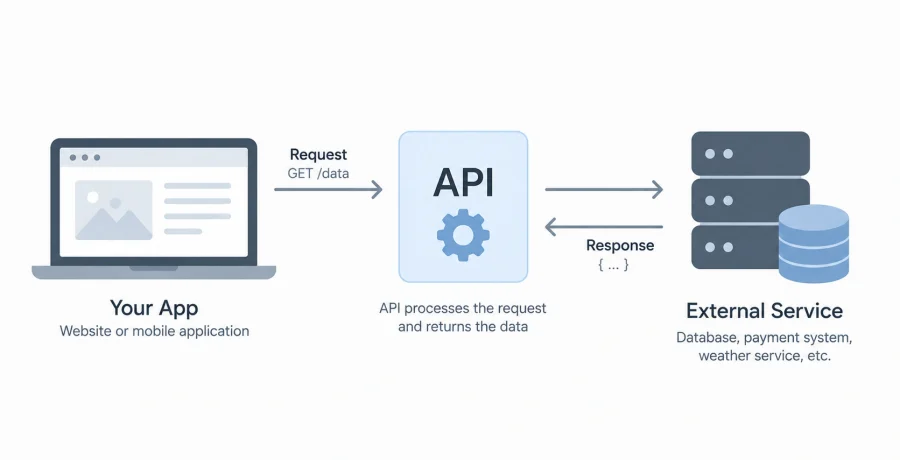
APIs are a fundamental part of modern websites, mobile applications, and digital services because they allow different software systems to exchange information and functionality. Instead of exposing how an entire application works internally, an API provides a defined way for one program to request something from another and receive a predictable response. Simple examples such as checking the weather, processing an online payment, or displaying a map make the concept much easier to understand.
What an API actually is in simple terms
An API, or Application Programming Interface, is a set of rules that allows one software system to communicate with another without needing to understand its internal code.
Think of an API as an intermediary between two applications. One application asks for information or requests an action, while the API accepts that request, passes it to the appropriate system, and returns the result.
For example, a travel website does not need to operate its own global weather-monitoring infrastructure to display the temperature at a destination. Instead, it can request current weather information from a specialized service through its API.
The developer only needs to know how to format the request and how the service structures its response. The internal databases, algorithms, servers, and other technologies behind the service can remain completely hidden.
How an API works step by step
Most API interactions follow a simple request-and-response model in which one application asks for data or an action and another system returns the result.
- A client sends a request. A website, mobile application, or another program contacts a specific API endpoint and specifies what information or action it needs.
- The server processes the request. The receiving system checks the request, validates permissions if necessary, performs the required operation, and may retrieve information from a database.
- The API sends a response. The server returns information describing whether the request succeeded along with any requested data.
- The application uses the result. The client processes the response and may display information to the user, update its interface, or perform another action.
This entire exchange can happen in fractions of a second. Users normally never see the underlying API communication because it occurs automatically in the background.
A simple real-world example of an API in action
A weather application demonstrates how one program can use an API to provide information produced and maintained by an entirely different service.
Imagine opening a mobile application and searching for the weather in London. The application may not store current weather information itself. Instead, it sends a request to a weather service API containing the location.
The weather provider receives the request, identifies London, obtains the relevant information, and returns structured data containing temperature, humidity, wind speed, forecast conditions, and other values.
The mobile application reads this response and transforms the raw information into the icons, numbers, graphs, and forecasts displayed on the screen.
The same principle applies to thousands of other services. A website can request exchange rates from a financial API, coordinates from a mapping service, delivery information from a logistics provider, or product availability from an online store.
What API requests and responses contain
API communication usually contains structured information that tells the server what the client wants and tells the client what happened after the request was processed.
- Endpoint. The endpoint is the address representing a particular API resource or operation, such as users, products, orders, or messages.
- HTTP method. Methods such as GET, POST, PUT, PATCH, and DELETE commonly indicate whether the client wants to retrieve, create, update, or remove information.
- Headers. Headers can contain additional information about the request, including authentication credentials and expected content formats.
- Request body. When data needs to be submitted, the body can contain information such as account details, form values, or parameters for an operation.
- Response. The server typically returns a status code together with structured data, often formatted as JSON.
For example, an HTTP status code of 200 generally indicates that a request succeeded, while 404 indicates that the requested resource could not be found. Other status codes communicate authentication problems, invalid requests, server errors, and additional conditions.
Common types of APIs and where they are used
APIs can follow different architectural styles and communication technologies depending on the requirements of the systems they connect.
- REST APIs. REST is widely used for web and mobile applications and commonly exchanges data over HTTP using familiar methods such as GET and POST.
- GraphQL APIs. GraphQL allows clients to describe the specific data they need, which can be useful when applications require flexible access to connected information.
- SOAP APIs. SOAP is a structured protocol based on XML and remains present in enterprise, financial, governmental, and legacy systems.
- WebSocket APIs. WebSockets maintain a persistent connection between systems and are useful for real-time functionality such as chats, live dashboards, multiplayer applications, and notifications.
These approaches solve different problems. REST is often straightforward for conventional web services, while real-time applications may require persistent communication. Developers choose an API design according to how information needs to move between systems.
How websites and applications use APIs every day
Many features that appear to be part of a single application are actually powered by multiple external or internal services communicating through APIs.
- Online payments. E-commerce websites can communicate with payment providers to create transactions and receive payment status information.
- Maps and locations. Applications use mapping APIs to display maps, search for addresses, calculate routes, and work with geographical coordinates.
- Authentication. APIs can enable users to sign in through existing identity providers rather than creating an entirely separate authentication process.
- Shipping and delivery. Online stores can retrieve delivery prices, generate shipments, and receive tracking updates from logistics services.
- Data and content. News, weather, financial information, product catalogs, analytics, and other types of content can be obtained from specialized APIs.
APIs are also heavily used inside companies. A frontend may communicate with a company’s own backend through an API, while separate internal services exchange information without users ever knowing that multiple systems are involved.
How API authentication and access keys work
Authentication helps an API determine who is making a request and whether that user or application has permission to access the requested resource.
One common method is an API key. A service generates a unique credential for a developer or application, and that credential is included with requests. The provider can then identify the application, enforce usage limits, track activity, or restrict access.
More complex systems often use tokens and authorization standards such as OAuth. These mechanisms can provide temporary or limited permissions instead of giving an application permanent access to an entire account.
API credentials must be protected. Secret keys should generally not be placed directly in public frontend code or committed to public repositories because anyone who obtains them may be able to make requests using the owner’s account or quota.
Authentication is also different from authorization. Authentication establishes identity, while authorization determines which resources or actions that identity is permitted to access.
Why developers use APIs instead of building everything from scratch
APIs allow developers to reuse specialized functionality and connect existing systems instead of rebuilding complex services for every new application.
Consider online payments. Building an entire payment-processing infrastructure involves far more than creating a checkout button. It requires communication with financial systems, transaction processing, security mechanisms, fraud prevention, reporting, and numerous operational processes.
Using an established payment service through an API allows a development team to focus on its own product while integrating the functionality it needs.
APIs also make large applications easier to divide into separate components. A company might have independent services for user accounts, orders, notifications, analytics, search, and payments. Each service can expose an API so other parts of the system can communicate with it through clearly defined interfaces.
This modular approach can simplify development because teams do not need to understand every internal implementation before connecting systems together.
What beginners should learn before working with APIs
Beginners do not need to master advanced backend development before using APIs, but understanding several web fundamentals makes API documentation much easier to follow.
Start with the basic structure of HTTP and learn what requests, responses, URLs, headers, methods, and status codes mean. Understanding JSON is particularly useful because it is one of the most common formats for exchanging data through modern web APIs.
Next, practice sending simple GET requests and examining the responses. After that, experiment with POST requests, parameters, request bodies, authentication headers, and error handling.
It is equally important to learn how to read API documentation. Good documentation explains available endpoints, required parameters, authentication methods, request limits, example responses, and possible errors.
Once these fundamentals become familiar, APIs stop looking like mysterious connections between applications. They become predictable interfaces: one system sends a correctly structured request, another processes it, and a structured response comes back. That simple pattern is behind an enormous number of features used across modern websites, mobile apps, and digital services every day.