

Choosing web hosting affects much more than where a website’s files are stored. The hosting environment can influence loading speed, uptime, security, traffic capacity, and how easily a project can grow in the future. Before selecting a provider, it is important to compare hosting architecture, available server resources, performance guarantees, security features, technical support, and both introductory and renewal pricing.
What web hosting actually does for your website
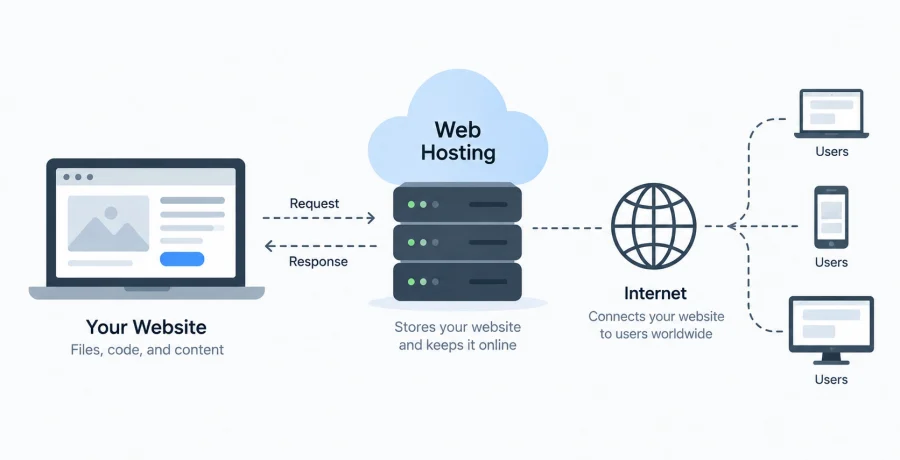
Web hosting provides the server infrastructure that stores website resources, processes requests, and makes the website available to visitors through the internet.
When someone enters a domain into a browser, the request is directed to the infrastructure hosting the website. The server then delivers HTML pages, images, stylesheets, scripts, or dynamically generated content required to display the page.
For dynamic websites, hosting may also run backend applications, communicate with databases, execute scheduled tasks, process API requests, and manage other server-side operations.
The quality of this infrastructure matters because an underpowered or poorly configured server can become a bottleneck even when the website itself is well optimized. Hosting should therefore be considered part of a website’s technical architecture rather than simply a place to upload files.
The main types of web hosting and how they differ
Hosting services mainly differ in how computing resources are allocated and how much control customers receive over the underlying server environment.
- Shared hosting. Multiple customers use the resources of the same physical server. It is inexpensive and relatively easy to manage, making it suitable for smaller websites with modest requirements.
- VPS hosting. A Virtual Private Server provides an isolated virtual environment with allocated CPU, memory, and storage resources, offering more control than conventional shared hosting.
- Cloud hosting. Applications run on cloud infrastructure that can distribute workloads across multiple resources and often makes scaling easier as demand changes.
- Dedicated hosting. A complete physical server is assigned to one customer, providing substantial control and predictable resources at a higher cost.
- Managed hosting. The provider handles some technical responsibilities such as server configuration, updates, monitoring, backups, or application-specific optimization.
The categories can overlap. For example, a provider can offer managed VPS or managed cloud hosting. When comparing plans, look beyond the marketing name and examine what infrastructure, management, and resources are actually included.
Which server specifications actually matter
Server specifications determine how much work a hosting environment can perform, but the importance of each resource depends on the type of website and its workload.
- CPU. Processor resources affect how quickly the server can execute application code, generate dynamic pages, process requests, and perform background operations.
- RAM. Memory is used by operating systems, databases, applications, caching services, and active processes. Insufficient RAM can significantly reduce performance.
- Storage. Available disk space determines how much website data, media, logs, backups, and application content can be stored.
- Disk performance. Modern SSD or NVMe storage can improve database operations, file access, caching, and other workloads involving frequent reading and writing.
- Bandwidth and transfer limits. Hosting plans may limit how much data can be transferred or restrict network speed, which becomes important for high-traffic or media-heavy websites.
Raw specifications do not tell the entire story. Two plans advertising similar CPU and memory can perform differently because of processor generation, resource sharing, virtualization, storage architecture, network capacity, and server configuration.
How much web hosting costs and what affects the price
The cost of hosting is determined by resources, infrastructure, management, support, additional services, and the amount of control provided to the customer.
Entry-level shared hosting is usually inexpensive because many accounts share the same physical infrastructure. VPS plans cost more because customers receive isolated environments and more predictable resources, while dedicated servers generally have higher prices because an entire machine is reserved for one customer.
Managed services also tend to cost more than unmanaged alternatives. The additional price can cover operating system maintenance, monitoring, backups, security configuration, technical assistance, or optimization.
It is important to compare regular prices rather than looking only at promotional offers. Some hosting companies provide significant discounts for the first billing period and charge a considerably higher rate when the service renews.
Additional expenses can include domain registration, premium backups, email hosting, extra storage, additional IP addresses, increased traffic allowances, control panels, security services, and migration assistance.
Shared hosting vs. VPS vs. dedicated servers: which one do you need
The appropriate hosting level depends primarily on workload, traffic, technical requirements, and the amount of server control the project needs.
Shared hosting can be sufficient for portfolios, small company websites, blogs, landing pages, and other projects with relatively predictable traffic. Its major advantage is simplicity: the provider usually handles much of the server administration.
A VPS becomes useful when a project requires more resources, custom server software, specific configurations, better isolation, or greater control. Growing online stores, web applications, APIs, and websites receiving substantial traffic often move into this category.
Dedicated servers provide considerably more hardware control and can support demanding applications, large databases, specialized workloads, or projects requiring dedicated resources. However, they also introduce additional cost and administration.
More infrastructure is not automatically better. Purchasing an expensive dedicated server for a small informational website can waste money without creating a meaningful improvement for visitors.
Why uptime, server location, and performance matter
Reliable hosting should keep a website consistently available while delivering content quickly to the geographic regions where its visitors are located.
Uptime represents the percentage of time that hosting infrastructure remains operational. Even small differences can become meaningful over long periods. Providers commonly publish uptime targets or service-level commitments, but customers should examine how those commitments are defined and whether compensation is offered when targets are missed.
Server location can influence latency. If most visitors are located in Europe, hosting the application closer to that audience can reduce the time required for network requests to travel between users and servers.
Content Delivery Networks can further reduce geographical delays by caching static resources across multiple locations. However, a CDN does not eliminate the importance of efficient origin infrastructure, particularly for dynamic requests.
Performance should therefore be evaluated through real measurements. Response times, application performance, database speed, network latency, and behavior under increased traffic provide more useful information than promotional claims alone.
What security and backup features to look for in a hosting provider
A hosting provider should offer infrastructure and recovery features that reduce common security risks and help restore the website when failures occur.
- HTTPS and TLS support. The hosting environment should make it straightforward to install and automatically renew certificates used to encrypt connections.
- DDoS protection. Network-level protection can help absorb or filter malicious traffic intended to make a website unavailable.
- Account security. Two-factor authentication, secure access controls, SSH key support, and detailed permission management can help protect hosting accounts.
- Automatic backups. Regular backups provide recovery options after accidental deletion, software failures, compromised websites, or database problems.
- Monitoring and security updates. Managed services should clearly explain which components are monitored and which operating system or software updates the provider handles.
Backup frequency is only one consideration. Check how long backups are retained, where they are stored, whether restoration costs extra, and whether customers can restore data without contacting support.
Critical projects may also maintain independent backups outside the hosting provider. This reduces dependence on a single company or infrastructure environment during a serious failure.
How to choose hosting based on the type of website you are building
The most effective way to select hosting is to begin with the actual technical requirements of the website and then find the simplest infrastructure capable of meeting them reliably.
- Identify the application type. Determine whether you are hosting a static website, CMS, online store, custom web application, API, database-driven service, or another workload.
- Estimate traffic and resource usage. Consider expected visitors, page views, file sizes, database activity, background tasks, and possible traffic spikes.
- Define technical requirements. Check which operating system, programming languages, databases, server software, runtime versions, and configuration options are required.
- Compare reliability and security. Examine uptime commitments, backup policies, security tools, monitoring, data center locations, and technical support.
- Plan for growth. Determine whether CPU, memory, storage, and bandwidth can be upgraded without requiring a complicated migration to another provider.
For a small static website, simple hosting may provide everything necessary. A WordPress site may benefit from managed hosting optimized for the CMS, while a custom application could require a VPS or cloud platform offering greater configuration flexibility.
The objective is not to purchase the largest plan available but to maintain enough capacity for normal operation and reasonable growth.
Common mistakes to avoid when choosing web hosting
The biggest hosting mistakes usually come from choosing a plan based only on price or marketing claims without examining technical restrictions and long-term requirements.
One common mistake is purchasing the cheapest plan without checking resource limits. Terms such as “unlimited” storage or bandwidth may still be subject to acceptable-use policies, CPU restrictions, database limits, inode limits, or other conditions.
Another mistake is ignoring renewal pricing. A low introductory price can make a hosting plan appear significantly cheaper than it will actually be over several years.
Website owners also sometimes underestimate backups. A provider advertising automatic backups does not necessarily guarantee frequent copies, long retention periods, or convenient restoration.
Technical support should be considered as well. For business-critical websites, the availability and competence of support can become more important than small differences in monthly pricing when a serious problem occurs.
Finally, avoid choosing infrastructure solely for hypothetical future growth. Start with resources appropriate for the current project while ensuring that a practical upgrade path exists. Good web hosting should provide sufficient performance, reliability, security, and flexibility without forcing a website to pay for infrastructure it does not yet need.