

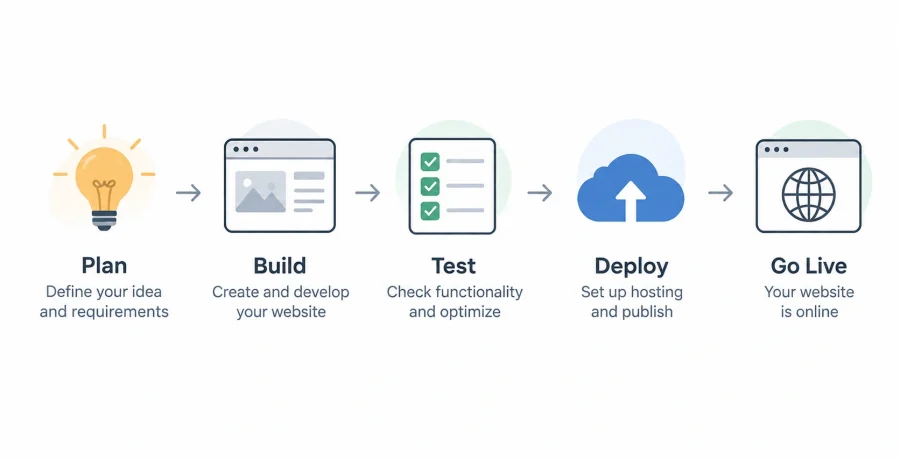
Building a website from scratch involves much more than writing a few HTML and CSS files. Before development begins, you need to define the purpose of the website, choose an appropriate technology stack, plan its structure and design, and decide whether server-side functionality is required. The complete process then moves through frontend and backend development, testing, optimization, deployment, and finally publishing the finished website online.
What you need to decide before building a website
A successful website starts with clear requirements because technical decisions should follow the goals of the project rather than determine them.
Before choosing a programming language or framework, define what the website is supposed to accomplish. A personal portfolio, corporate website, online store, news platform, and complex web application have very different technical requirements.
Start by identifying the target audience and the actions visitors should be able to perform. Decide what types of pages are required, what content will be published, whether users need accounts, and whether the website must process payments, store information, or communicate with external services.
It is also important to consider expected traffic, budget, development time, security requirements, and future expansion. A simple website can often be built using basic technologies, while a platform expected to support thousands of users may require a more carefully designed architecture.
How to choose the right technologies for your website
The right technology stack depends on the complexity of the website, available development skills, performance requirements, and how the project is expected to evolve.
- Project complexity. Static websites may require only HTML, CSS, and JavaScript, while interactive applications often benefit from frameworks and server-side technologies.
- Development experience. Choosing technologies your team already understands can reduce development time and prevent unnecessary technical problems.
- Performance requirements. Websites serving large amounts of dynamic content or handling frequent requests may require optimized frontend and backend architecture.
- Ecosystem and support. Mature technologies usually provide extensive documentation, libraries, development tools, and community resources.
- Long-term maintenance. Consider whether the technology is actively maintained and whether developers will be available to support the project several years later.
For many websites, HTML, CSS, and JavaScript remain the foundation. More complex interfaces can use frameworks such as React, Vue, or Angular. Backend development may involve Node.js, Python, PHP, Java, or other server-side technologies depending on project requirements.
How to plan the structure and design before writing code
Planning the website before development reduces unnecessary rewriting and creates a clearer experience for both users and developers.
Begin with a sitemap showing the main pages and their relationships. A typical business website might contain a homepage, services section, individual service pages, an about page, a blog, and contact information. More complex platforms may include dashboards, profiles, account settings, search pages, and administrative sections.
The next step is creating wireframes. These simple layouts show where navigation, headings, text, images, buttons, forms, and other interface elements will appear without focusing on visual details.
Once the structure is clear, the visual design can define typography, spacing, colors, icons, images, buttons, and reusable interface components. Designing these elements consistently makes development easier because the same patterns can be reused throughout the website.
Responsive behavior should also be planned at this stage. The interface needs to remain usable on desktop computers, tablets, and smartphones rather than being designed exclusively for one screen size.
Building the frontend: HTML, CSS, and JavaScript
Frontend development transforms the planned structure and visual design into the interface visitors actually see and interact with in their browsers.
HTML provides the semantic structure of a page. Headings, paragraphs, navigation elements, forms, images, buttons, lists, and other content should be organized logically so browsers, search engines, and accessibility technologies can understand the page.
CSS controls presentation. It defines layouts, typography, spacing, responsive behavior, animations, and other visual characteristics. Modern CSS features such as Flexbox and Grid allow developers to build sophisticated responsive layouts without relying on complicated workarounds.
JavaScript adds interactive behavior. It can control menus, validate forms, update content without reloading the entire page, communicate with APIs, display interactive interfaces, and manage application state.
For relatively simple websites, these technologies may be sufficient on their own. Larger applications can introduce frontend frameworks and build tools when the additional structure genuinely simplifies development.
When your website needs a backend and database
A backend becomes necessary when the website needs to process requests, manage private information, authenticate users, or generate dynamic content on the server.
- User accounts. Registration, login, password management, profiles, and permissions require secure server-side processing.
- Persistent data. Products, orders, articles, comments, customer records, and other information usually need to be stored in a database.
- Payments and private operations. Sensitive business logic and secret API credentials should not be exposed directly in frontend code.
- External integrations. Websites may need server-side communication with CRM systems, payment services, email platforms, analytics tools, or other APIs.
The backend receives requests from the frontend, performs the necessary operations, communicates with databases or external services, and returns a response. Databases such as PostgreSQL, MySQL, or document-oriented alternatives can be selected according to the structure and requirements of the application.
A purely informational website may not require a traditional backend at all. Avoiding unnecessary server-side infrastructure can reduce complexity, hosting costs, maintenance, and potential security risks.
How to test and optimize a website before launch
A website should be tested as a complete product rather than considered finished simply because its pages look correct on the developer’s computer.
- Test functionality. Check navigation, forms, buttons, authentication, search, payments, filters, and every other interactive feature.
- Check responsive design. Test different screen sizes and verify that menus, images, forms, and content remain usable on mobile devices.
- Test browser compatibility. Important pages should work correctly in the browsers commonly used by the target audience.
- Optimize performance. Compress images, remove unnecessary resources, reduce expensive scripts, configure caching, and investigate slow network requests.
- Review accessibility and SEO basics. Check semantic headings, page titles, descriptions, image alternative text, keyboard navigation, URLs, and other important elements.
Performance deserves particular attention because visually impressive websites can still provide a poor experience when they load slowly. Large images, unnecessary JavaScript libraries, excessive third-party scripts, and inefficient server requests are common sources of performance problems.
Testing should also include error scenarios. Forms should handle incorrect input, missing pages should return appropriate responses, and temporary server or network failures should not leave users without understandable feedback.
How domains, hosting, and deployment work
Publishing a website requires connecting its human-readable domain name to infrastructure capable of delivering the application to visitors over the internet.
A domain is the address people enter into a browser. It is registered through a domain registrar and configured through DNS records that tell internet systems where requests for the domain should be directed.
Hosting provides the infrastructure where website files or applications run. A simple static website can be hosted using static hosting services, while dynamic applications may require application servers, databases, containers, cloud infrastructure, or virtual machines.
Deployment is the process of moving a tested version of the website into its production environment. Modern workflows often automate deployment through Git repositories and continuous integration systems. When approved changes are pushed to a production branch, a service can build, test, and deploy the new version automatically.
HTTPS should also be configured so communication between visitors and the website is encrypted. Modern hosting platforms frequently automate TLS certificate creation and renewal.
How to publish your website online step by step
Publishing becomes much easier when development, infrastructure, domain configuration, and deployment are treated as separate but connected stages.
- Prepare the production version. Remove debugging code, configure production environment variables, optimize assets, and run final tests.
- Choose hosting. Select infrastructure appropriate for the website, whether that means static hosting, managed application hosting, a cloud platform, or a virtual server.
- Deploy the website. Upload the production files or connect the hosting platform to the project’s Git repository and execute the required build process.
- Connect the domain. Configure the necessary DNS records and enable HTTPS so visitors can securely access the website through its public address.
- Perform production testing. Open the live website on different devices, check important functionality, test forms and integrations, and verify that analytics and monitoring operate correctly.
Keeping deployment reproducible is important even for relatively small projects. If publishing depends on undocumented manual actions, future updates become more difficult and mistakes are more likely.
A simple documented deployment process makes it possible to release updates consistently and restore the website more quickly if something goes wrong.
What to do after your website goes live
Launching a website is the beginning of its operational lifecycle, not the end of the development process.
After publication, monitor performance, uptime, application errors, server resources, and user behavior. Analytics can reveal which pages attract visitors, where users leave the website, and which features are actually being used.
Security updates should become a regular part of maintenance. Frameworks, libraries, plugins, server software, and other dependencies can receive important fixes, so leaving a website unchanged for years can introduce avoidable risks.
Backups are equally important for websites containing databases or user-generated information. A backup strategy should include not only creating copies but also verifying that those copies can actually be restored.
Finally, use real-world data to guide improvements. Optimize slow pages, correct usability problems, update outdated content, improve search visibility, and add functionality when there is a clear reason to do so. Building a website from scratch is therefore an ongoing process: planning establishes the foundation, development creates the product, deployment makes it available, and continuous maintenance keeps it useful, secure, and reliable.